
If you’re comparing DocuWare and IS Docs, you’re likely looking for document management software that can help your business organize documents, automate workflows, improve security, and reduce reliance on paper-based processes.
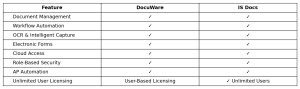
Both platforms provide many of the same core capabilities, including document management, workflow automation, electronic forms, OCR, and secure cloud access. For many businesses, the biggest difference isn’t the feature set itself, but how the software is licensed, deployed, and adopted across the organization.
The biggest difference is how the software is licensed at the end-user level.
For small and midsize businesses, those factors can have a significant impact on both cost and long-term value.
DocuWare vs. IS Docs at a Glance
What Do Both Platforms Offer?
Both DocuWare and IS Docs are designed to help businesses digitize information and streamline document-driven processes. Common features include:
- Digital document storage and retrieval
- OCR (Optical Character Recognition)
- Workflow automation
- Electronic forms
- Cloud access
- Document security and permissions
- Audit trails and compliance support
For organizations looking to reduce paper, improve document organization, and automate routine tasks, either platform can provide significant benefits.
DocuWare: Pros and Cons
DocuWare is one of the most established names in the document management software market. It offers a robust platform with a wide range of integrations and deployment options.
Pros
- Well-known and widely adopted platform
- Strong workflow automation capabilities
- Extensive integration options
- Flexible cloud-based deployment
Cons
- End-user licensing costs can increase as your user base grows
- Expanding access across departments may increase software expenses
- Can be more complex to administer for smaller organizations
For growing businesses looking for flexibility, licensing is often an important consideration. As more employees need access to documents and workflows, costs can rise depending on the licensing structure.

IS Docs: Pros and Cons
IS Docs combines AI-enabled document management, workflow automation, intelligent document capture, electronic forms, and records management in a single platform. Built on proven document management technology, it is designed to help organizations improve efficiency while maintaining control over critical business information.
Pros
- UNLIMITED user licensing
- Workflow automation and approval routing
- OCR and intelligent document capture
- Electronic forms and paperless workflows
- Secure document sharing and role-based permissions
- Accounts payable automation capabilities
- Company-wide adoption without additional user fees
Cons
- Smaller brand presence than some larger document management vendors
One of the most significant advantages of IS Docs is its unlimited-user model. Rather than limiting access to a select group of employees, businesses can extend document management capabilities to accounting, HR, operations, sales, management, and other departments without increasing licensing costs.
Which Document Management System Is Right for Your Business?
The best document management software depends on your organization’s goals, budget, and growth plans.
DocuWare may be a strong fit for businesses seeking a widely recognized platform with extensive integrations and a long history in the document management space.
IS Docs is an attractive option for organizations that want powerful document management and AI-enabled workflow automation while making adoption available across the entire company. With unlimited users, intelligent document capture, electronic forms, workflow automation, and secure document storage, IS Docs provides the tools businesses need to streamline operations without worrying about adding user licenses as they grow.
For many SMBs, that combination of functionality and scalability can deliver long-term value while making it easier to provide secure access to documents and workflows across the entire organization.
Frequently Asked Questions
Does IS Docs provide end-user training?
Yes. IS Docs includes training and support from U.S.-based professionals to help employees quickly learn the system and adopt new workflows. Users receive guidance on document management, search capabilities, workflow automation, electronic forms, and other key features, helping organizations get more value from their investment.
What tasks can IS Docs help eliminate or automate?
IS Docs can reduce or eliminate many manual document-related tasks, including:
- Filing and searching for paper documents
- Routing invoices and approvals by hand
- Printing, scanning, and physically distributing documents
- Emailing documents back and forth for approvals
- Managing paper forms and records
- Manually tracking document versions
- Entering data from scanned documents
By automating these processes, organizations can spend less time managing paperwork and more time focusing on business priorities.
How easy is it to add new users to IS Docs?
Adding users is easy and straightforward. Administrators can create users individually or import multiple users at once using a CSV file. Users can be assigned to teams and granted role-based access to documents, workflows, and folders. Since IS Docs offers unlimited user licensing, organizations can expand access across departments without purchasing additional user licenses.
About IS Docs
IS Docs simplifies document management with AI, secure automation, nationwide support, and unlimited users, allowing businesses to streamline paper and digital workflows without extra cost.